
Brilliant Cities Habit Tracker

I helped design a family habit-tracking app for Brilliant Cities that helps parents and children build healthier routines together. The platform educates families about the importance of consistent habits, lets parents track progress for each child, and helps Brilliant Cities community engagement managers support families beyond their structured programs.

SHORT ON TIME?

Brilliant Cities app screens — login, onboarding, and goal categories
Brilliant Cities app screens — search, goals card, and family dashboard

TIMELINE

Sept 2024 - Dec 2024

TOOLS

Figma

ROLE

Product Designer

SKILLS

  • Product Design
  • User Research
  • Design Systems

Problem

Brilliant Cities runs dozens of program offerings, like community dinners, fitness classes, computer lab hours, etc, out of neighborhood hubs, all meant to help families grow. Unfortunately, that support ends once a family leaves a program and Brilliant Cities has almost no visibility into what happens next. With only biannual check-ins, there was no way to help families keep practicing healthy habits at home, and no way for families to track that progress themselves either. On top of that, most of the families Brilliant Cities serves have low-tech literacy, which meant any solution had to be simple enough to use without a learning curve.

Understanding the Users

PERSONA

Cynthia Grey

Portrait of persona Cynthia Grey

ABOUT

Single Mom

Struggles with finding time to attend Brilliant Cities Programs

“I want my kids to develop healthy habits, but I don’t have time to attend Brilliant Cities’ programs. I need simple, practical ways to help them eat better and stay active.”

PAIN POINTS

  • Low-tech literacy
  • Lack of resources and knowledge on cultivating healthy habits within her children
  • Lack of support from community and family

NEEDS:

Cynthia wants to help cultivate healthy habits in her children but lacks the resources and knowledge to do so. She wants an application that will help inform her on how to help her children grow in various aspects. Because she has such a busy schedule, she wants to continue enriching her children at home in addition to making time to attend Brilliant Cities’ programs.

Creating a Design System

For this project, I collaborated with another product designer to create a comprehensive design system to use for our Habit Tracker Web Application. We were given a comprehensive branding kit with colors, fonts, accordions, and more components that we were able to build off of and use as inspiration.

Color palette
Typography samples
Form and list components
Tags, checkboxes, and text area
Goal and habit accordion components
Button components

Project Considerations

  1. Our user base was mainly composed of adults who could potentially have low tech literacy, so I made it a priority to ensure my designs were clear and intuitive.
  2. Our project deliverables weren’t clearly defined at the start due to miscommunication within Brilliant Cities, so it was important for me to stay adaptable and flexible to potential changes.
  3. We were on a tight timeline, with only three months to design and put our application into production. With this in mind, I made sure to prioritize efficiency without sacrificing design quality.
  4. Along with collaborating with Brilliant Cities, we also worked with a child psychologist to make sure our wording and phrasing were supportive and encouraging for children. This emphasized the importance of making our designs and language child-friendly.
  5. Our client specifically wanted a mobile website because their clients would mostly be accessing this application on phones through their website due to having low tech literacy.

Solution

The Habit Tracker is a mobile-first web app that lets families set personalized habit goals for each child, get gentle reminders to stick with them, and stay connected to Brilliant Cities’ support even outside of a scheduled program.

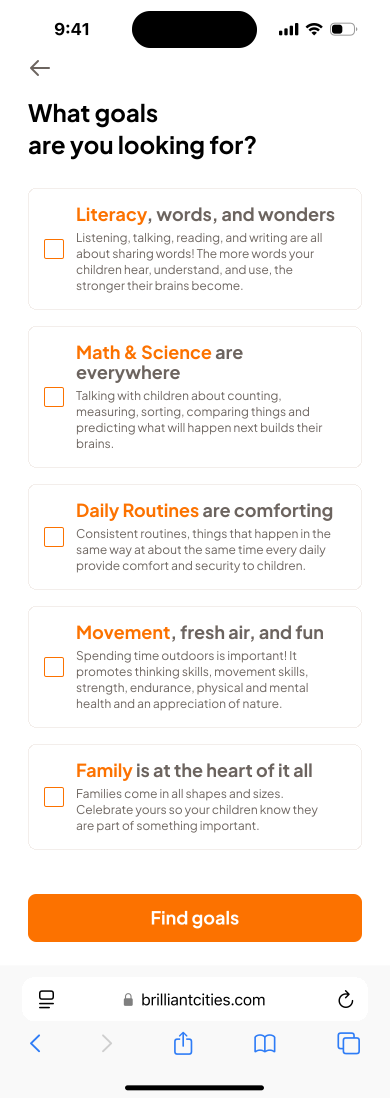
Goal Categories Page

Brilliant Cities was very intentional about what types of goal categories they wanted, so we had to come up with a very unique design to fit their needs.

  • Specific goal category cards so that users would be able to understand the different categories and what habits they included
  • Multi-select check box to allow users to search through multiple goal categories

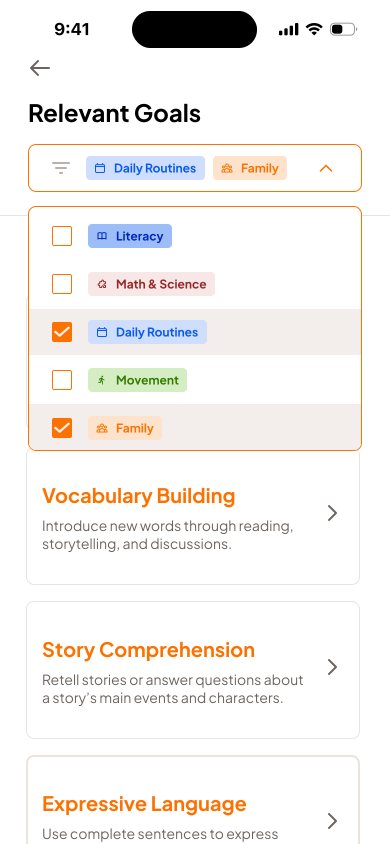
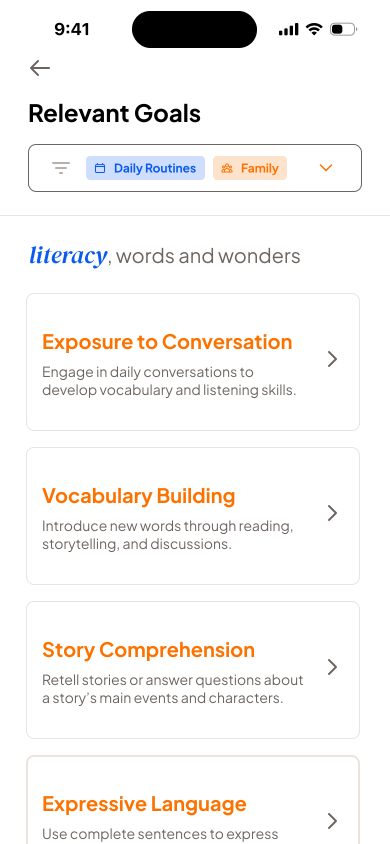
Relevant Goals Search Functionality

To simplify the process of searching through various goal categories, we drew inspiration from shopping website filters to develop a unique search functionality.

  • Pill search style helps users associate different icons and colors with different goal categories, making it easier to filter and search for different habits
  • Dropdown menu allows the user to see all the different goal category options and removes the need for them to type and recall the names of the goal categories
Relevant goals search with category filter pills
Relevant goals search results grouped by category

Relevant Goals Search Results

  • Separating habits by their goal category makes it easy for the user to swipe and see all the various goal options
  • Organizing the search results in this structure made the most sense since this is meant to be a mobile web application

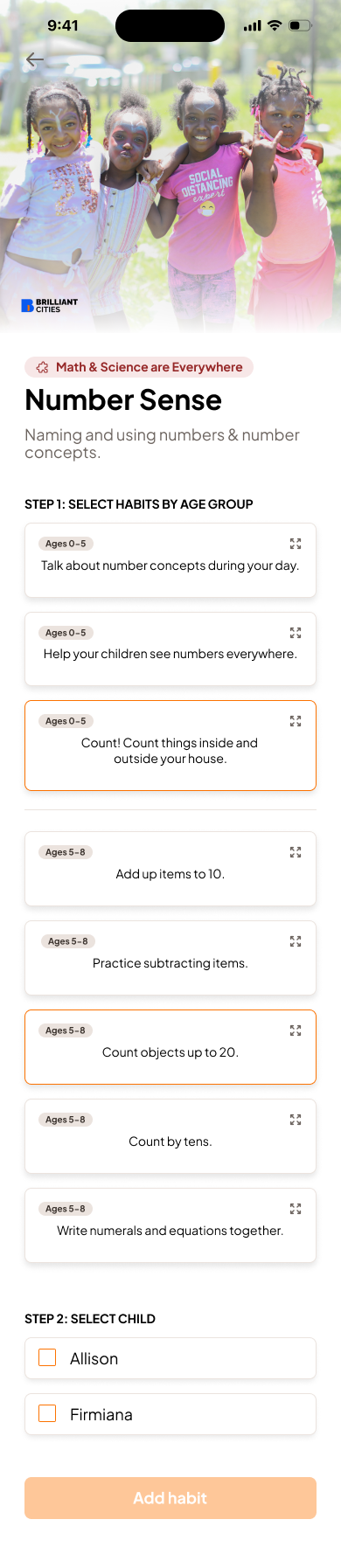
Goals Card

Since we collaborated with a child psychologist to determine the best wording for encouraging healthy habits, we needed to design a creative and engaging way to present tips and advice that parents could easily follow and apply.

  • Clear pill labels for each goal category helps users quickly recognize which section they’re viewing
  • Including steps helps users adapt to the interface and navigate confidently during their first use
  • Grouping habits by age makes it easier for users to find recommendations that match their needs
  • Sorting and tracking habits by child allows parents to conveniently monitor each child’s progress

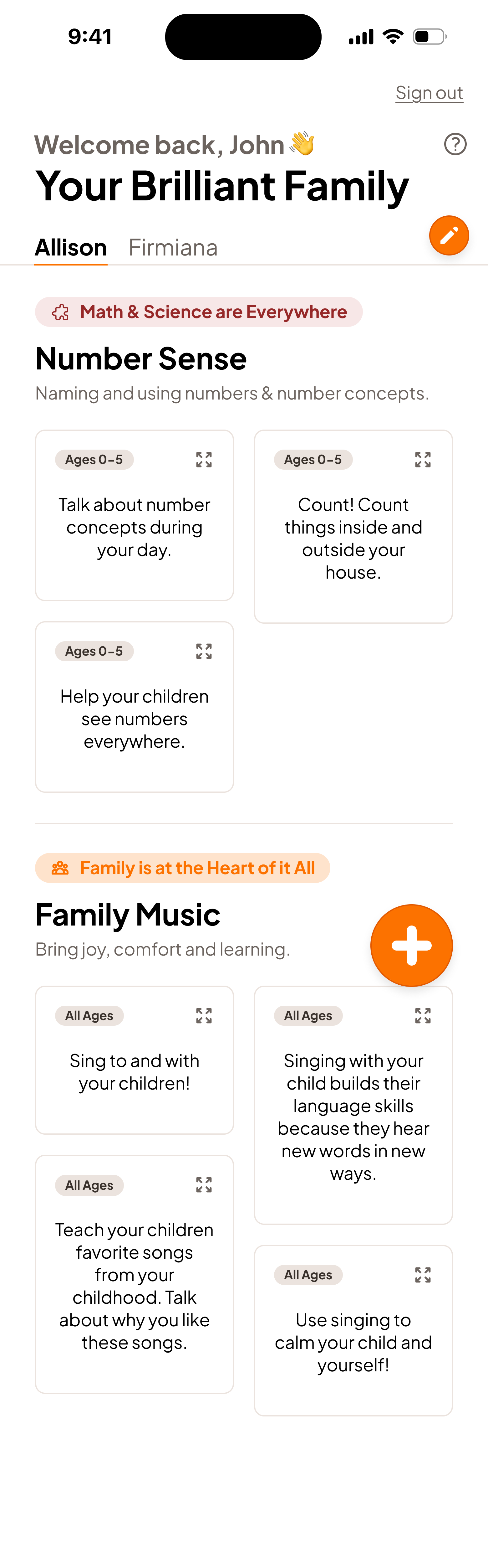
Family Dashboard

  • Categorizing habits by goal makes it easier for users to track progress within each area
  • Creating separate pages for each child gives users more space and flexibility to add as many habits as they’d like
  • A floating action button for adding children or goals simplifies both processes and makes navigation more intuitive

Takeaways

  1. Communicating clearly in a design partnership

This was my first time collaborating with another designer, which emphasized the importance of clear and consistent communication in a design partnership. We spent time aligning our ideas to reach a shared vision and collaborated closely to understand each other’s design styles.

  1. Managing a project end to end on a tight timeline

It was also my first experience managing an end-to-end project on a tight timeline, which pushed me to design more efficiently and focus on what truly mattered in the process.

  1. Balancing creativity with business and technical goals

Since I had only worked on solo design projects before, collaborating with a PM and developers also taught me how to balance creativity with business goals and technical feasibility.

Check out my other work!